Enterprise networking and office LAN
What you may seeLC duplex is common for switch uplinks that use SFP/SFP+ modules. SC still appears on some panels and media converters.
A fiber optic connector terminates an optical fiber so it can connect to a device, a patch panel or another fiber. This guide explains LC vs SC, UPC vs APC and single-mode vs multimode, so you can choose parts that actually work together.
Jump to: LC vs SC UPC vs APC How to choose FAQ
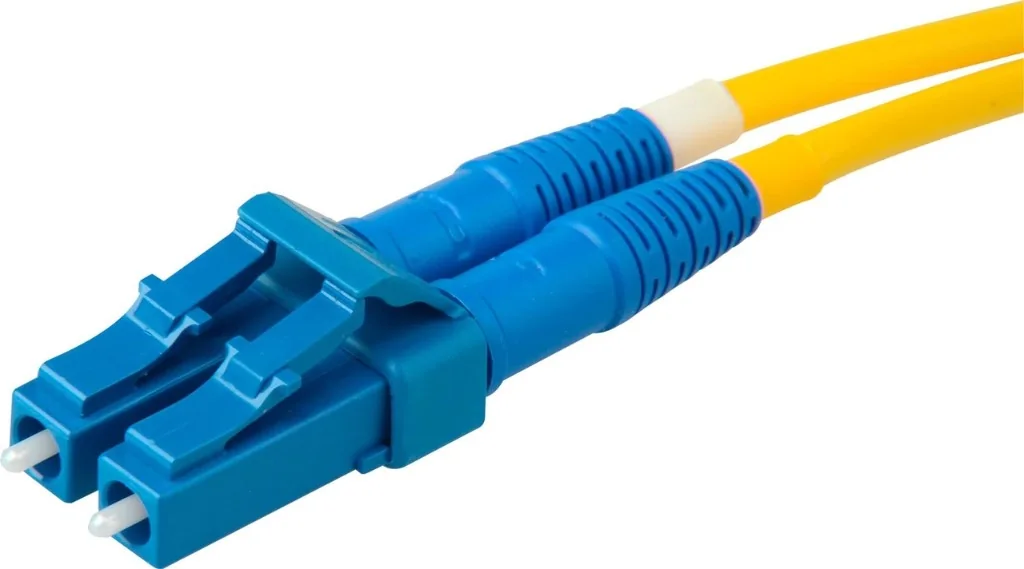
A fiber optic connector fixes the end of an optical fiber in a precise position so light can pass to the next fiber, a transceiver or a device port. It aligns the tiny fiber core (about 9 µm in single-mode fiber) with the core on the other side, so as little light as possible is lost or reflected at the joint.
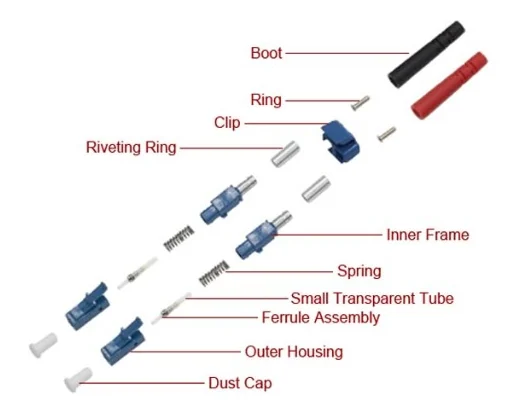
A precision ceramic tube that holds the fiber. Its diameter is 1.25 mm for LC and 2.5 mm for SC.
The plastic housing that carries the ferrule and ties it to the cable through the boot.
A latch or push-pull housing locks the connector, while a sleeve inside the adapter lines up the two ferrules.
The polished tip of the ferrule where the two fibers meet. Its shape (UPC or APC) and cleanliness matter a lot.
Connectors appear on fiber patch cords, patch panels and optical distribution frames (ODFs), switches and optical transceivers. Four ideas explain most real-world problems:
A connector does not make your network faster. Actual performance depends on the complete optical link: the transceivers, fiber type, wavelength, distance and installation quality. A good connector helps you avoid unnecessary loss; it does not raise the link speed.
LC and SC are the two connector families you will meet most often on fiber patch cords and panels. Both exist in single-mode and multimode versions, and both come in UPC and APC polish.
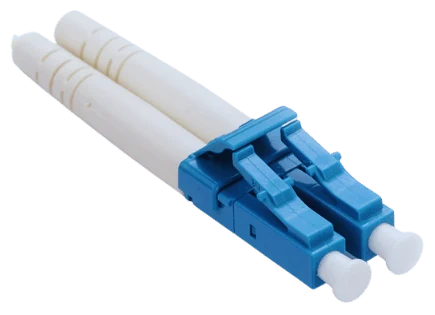
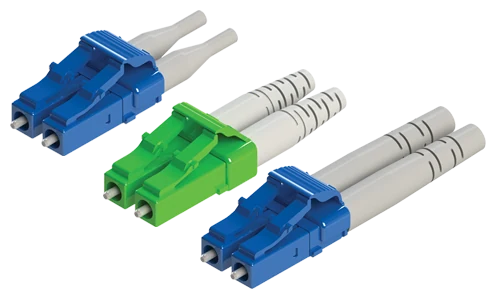
LC stands for Lucent Connector. It is a small-form-factor connector with a 1.25 mm ferrule and an RJ-45-style latch that clicks into the port.
Not every optical module uses LC. The interface depends on the module specification. Some modules use a single fiber (BiDi), SC, or MPO/MTP connectors. Always check the datasheet of the exact module.
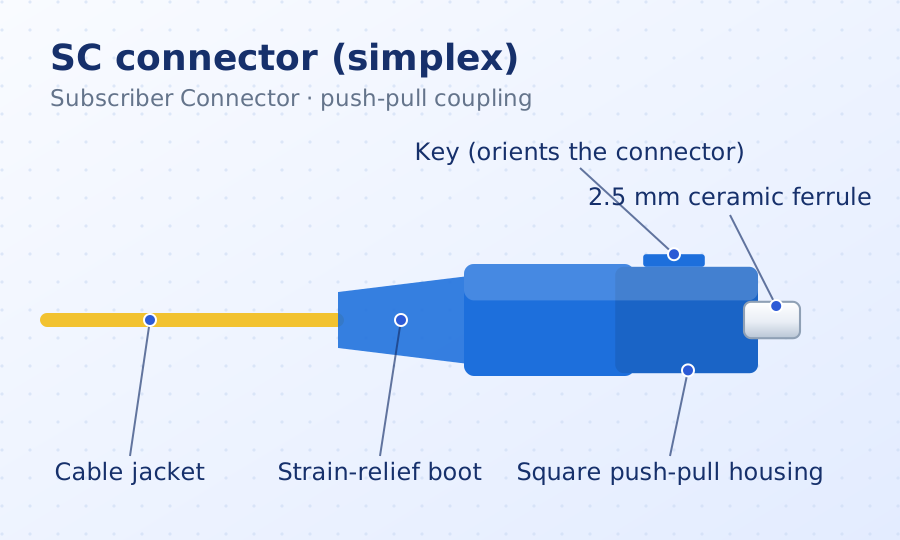
SC stands for Subscriber Connector and is also commonly called Standard Connector. It has a square body, a 2.5 mm ferrule and a push-pull coupling: push to connect, pull the body to release.
SC is not obsolete or inherently less reliable. It remains widely specified in telecom and FTTH networks.
| Feature | LC connector | SC connector |
|---|---|---|
| Full form | Lucent Connector | Subscriber Connector |
| General design | Small form factor | Larger push-pull form factor |
| Coupling mechanism | Latch mechanism | Push-pull mechanism |
| Relative size | Smaller | Larger |
| Port density | Generally higher | Generally lower in equivalent space |
| Typical applications | High-density switches, transceivers, data centers | Telecom, fiber distribution, compatible patch panels |
| Fiber compatibility | Available in single-mode and multimode versions | Available in single-mode and multimode versions |
| Polish options | UPC and APC variants exist | UPC and APC variants exist |
| Selection criteria | Equipment interface, density, fiber and polish | Equipment interface, fiber and polish |
Swipe sideways to see the whole table on small screens.
Neither connector is universally better. Select the type supported by your actual equipment and optical link design.
UPC and APC do not describe the connector shape. They describe how the tip of the ferrule is polished, which changes how much light is reflected back toward the source.
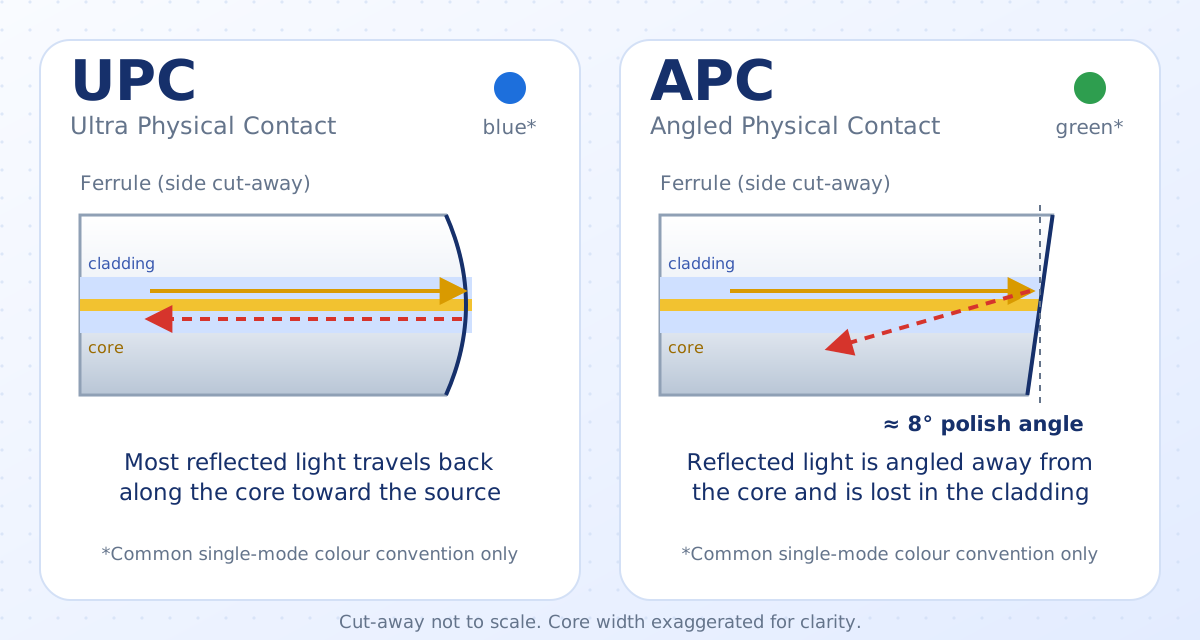
UPC stands for Ultra Physical Contact. The ferrule end face is carefully polished into a slightly curved surface that meets the other fiber head-on.
APC stands for Angled Physical Contact. The end face is polished at an angle, commonly around 8 degrees, so reflected light is directed away from the fiber core.
How much of the light you send is lost as it crosses a connector. Lower is better, and every connection in the link adds to the total.
How much of the light bounces back toward the source. It is stated in dB, and a higher number means less reflection. Datasheets for single-mode parts often target about 50 dB or better for UPC and 60 dB or better for APC, but always read the actual product specification.
| Feature | UPC | APC |
|---|---|---|
| Full form | Ultra Physical Contact | Angled Physical Contact |
| End-face polish | Curved physical-contact polish | Angled physical-contact polish |
| Typical appearance | Blue for many single-mode interfaces | Green for many single-mode interfaces |
| Return loss | Good for many applications | Typically better for comparable interfaces |
| Reflection control | Suitable for conventional optical links | Better suited to reflection-sensitive links |
| Common applications | Many Ethernet and general optical links | Many PON, FTTH, CATV and specified optical links |
| Mating compatibility | Requires compatible UPC interface | Requires compatible APC interface |
| Selection | Follow module/system specification | Follow module/system specification |
Swipe sideways to see the whole table on small screens.
Their end-face geometries differ, and incompatible mating can cause increased loss, reflections or physical damage. Always verify interface compatibility and follow manufacturer specifications. (A patch cord may have APC on one end and UPC on the other, as long as each end mates only with its own type.)
APC is not "faster" or universally better than UPC. It is the right choice when the equipment or network design specifies it.
LC and SC identify the connector family. UPC and APC identify the polish. Together they give four common combinations. Not every combination is equally common or appropriate for every product.
| Connector | UPC polish | APC polish |
|---|---|---|
| LC Small form factor, latch |
LC/UPC Compact connector with the standard curved polish. Seen on many duplex patch cords for SFP-type module ports. |
LC/APC Compact connector with the 8-degree polish. Used where the equipment specifies APC in a small form factor. |
| SC Square body, push-pull |
SC/UPC Square push-pull connector with the standard curved polish. Common on single-mode patch panels and general links. |
SC/APC Square push-pull connector with the 8-degree polish. Widely specified in FTTH, PON and CATV equipment. |
Blue and green dots show the common single-mode colour convention. Colour alone never proves compatibility.
The correct choice must be confirmed against the device, adapter, patch panel, transceiver and optical link specification.
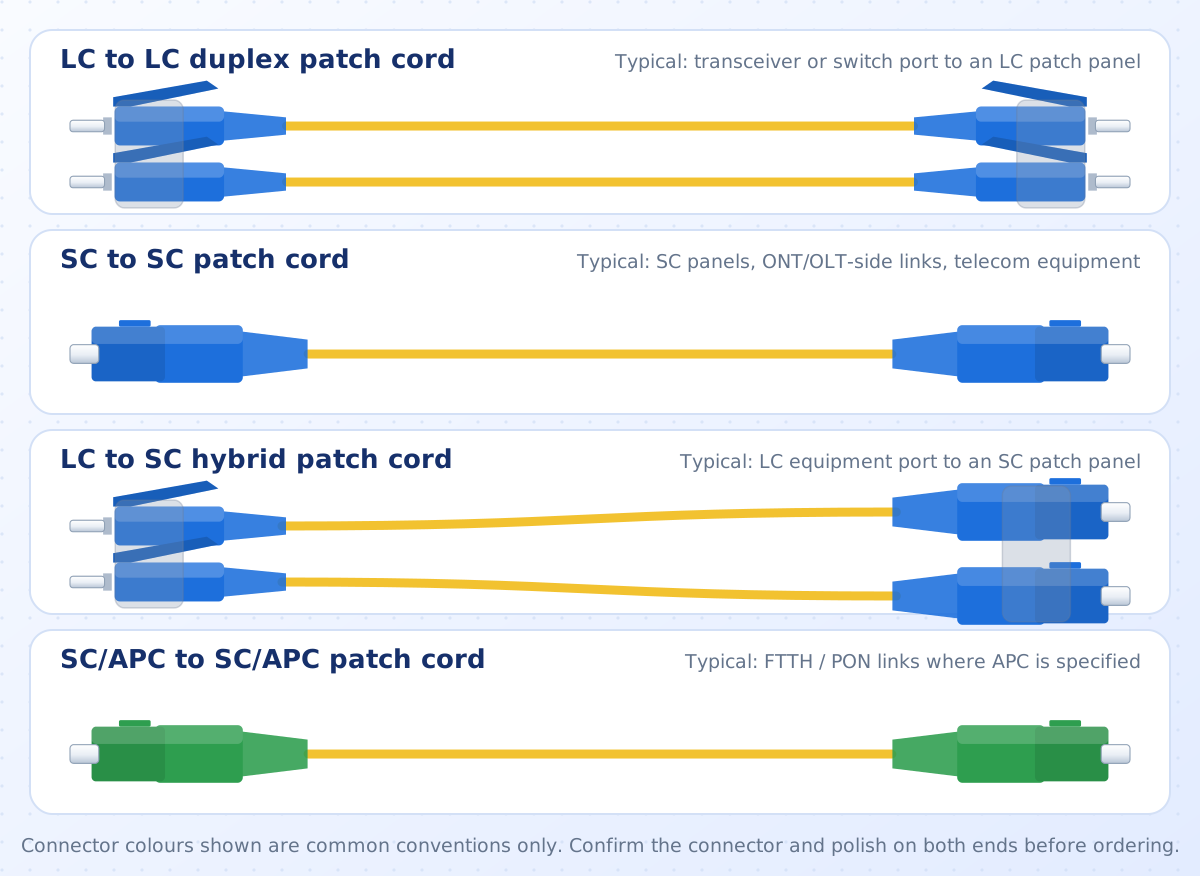
Simplex and duplex describe how many fibers a patch cord carries, not the connector shape and not the speed. You can buy LC and SC patch cords in both versions.
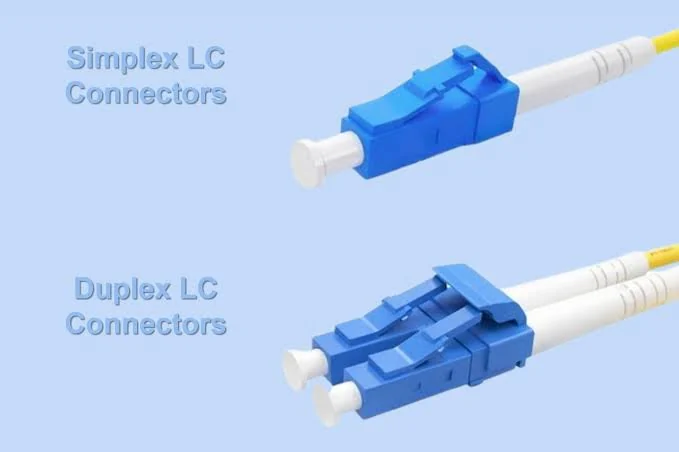
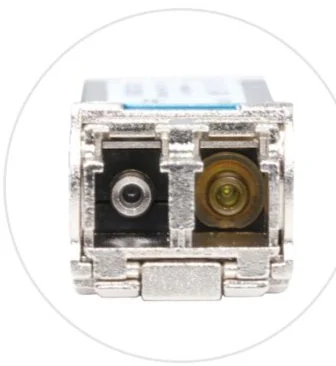
Simplex means one fiber with one connector at each end of the cord. Light travels in one direction on that fiber, unless the equipment sends both directions on the same fiber using two different wavelengths (a BiDi link).
Duplex means two fibers side by side, ending in two connectors held together by a clip. One fiber carries transmit and the other carries receive, so data flows both ways at the same time.
| Feature | Simplex | Duplex |
|---|---|---|
| Fibers in the cord | One | Two (a transmit and a receive pair) |
| Connectors at each end | One | Two, held together by a clip |
| How a two-way link works | Only with BiDi optics that use two wavelengths on one fiber | Naturally: one fiber sends, the other receives |
| Typical equipment | BiDi SFP modules, PON and FTTH equipment, pigtails, test leads | Standard SFP, SFP+ and SFP28 modules, switches, servers, duplex panels |
| Fiber used per link | Lower | Double that of a simplex link |
| Polarity to check | Not applicable to the cord itself, but BiDi module pairs must match | Transmit at one end must reach receive at the other |
| Available as LC and SC | Yes | Yes (LC duplex is the more compact) |
Swipe sideways to see the whole table on small screens.
In a duplex link, the transmit (Tx) of one device must land on the receive (Rx) of the other. A standard duplex patch cord is built so the two fibers cross over between the ends. If a panel, adapter or cassette crosses the pair a second time, Tx meets Tx and the link stays down. On many duplex LC cords the clip can be flipped to swap the pair, but follow the cord maker's instructions, and swap the pair at one end only.
Simplex is not slower and duplex is not faster. Link speed comes from the transceivers, the fiber and the distance. Simplex and duplex only describe how the fibers are arranged. Duplex LC also comes as uniboot, where two fibers share one boot and one cable. It is a good fit for dense panels, and it is still a duplex cord.
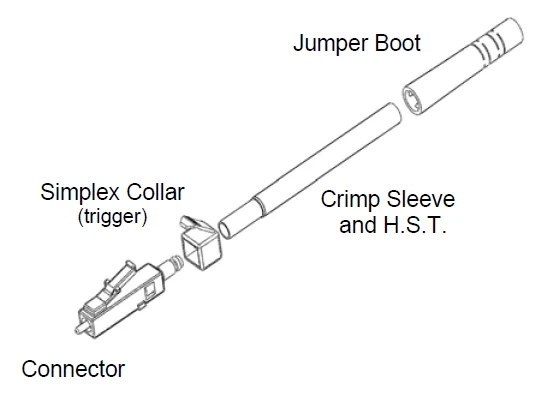
A simplex LC connector is built from a small set of parts. The connector body holds the 1.25 mm ferrule and the latch. A crimp sleeve locks the cable strength member to the body, and the jumper boot protects the fiber from sharp bends at the back of the connector. In a duplex LC, two of these are held together by a clip.
Field termination of connectors is specialist work. Trulink can handle fiber splicing and testing for you.
Connector type is not a substitute for fiber type. LC and SC connector families are made for both single-mode and multimode fiber, as long as the specific assembly is designed for the fiber you use.
The difference is the size of the fiber core. A single-mode core is so thin that light follows essentially one path, so it can travel very far with little spreading. A multimode core is much wider, so light takes many paths (modes) at once. Those paths arrive at slightly different times, which limits how far a multimode link can go at high speed.
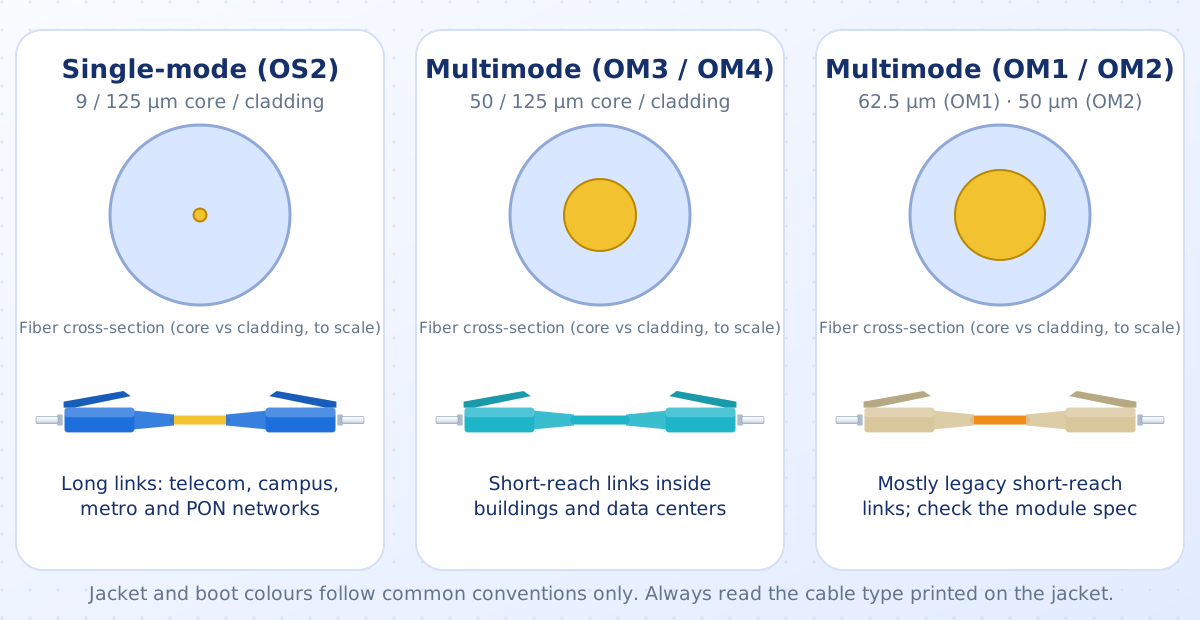
Match the fiber to the transceiver. The module defines the wavelength and fiber type it expects. Reach figures above are examples only; real limits depend on the exact module, fiber grade and link design.
| Feature | Single-mode (SMF) | Multimode (MMF) |
|---|---|---|
| Core / cladding size | About 9 µm / 125 µm | 50 µm / 125 µm (OM2 to OM5) or 62.5 µm / 125 µm (OM1) |
| How light travels | Essentially one path (mode) | Many paths (modes) at once |
| Typical light source | Laser | VCSEL laser or LED |
| Typical wavelengths | 1310 nm and 1550 nm | 850 nm and 1300 nm (OM5 also supports 850 to 950 nm wavelength-division use) |
| Distance (10G examples) | 10 km (10GBASE-LR), 40 km (ER), 80 km (ZR) with suitable optics | Up to 300 m on OM3 and 400 m on OM4 (10GBASE-SR) |
| Bandwidth limit | Set by the equipment, not the fiber, for most links | Limited by modal dispersion; improves from OM1 to OM5 |
| Common jacket colour | Yellow | Orange (OM1, OM2), aqua (OM3, OM4; some OM4 is violet), lime green (OM5) |
| Cost pattern | The fiber is often priced similarly to or below multimode, but long-reach laser optics usually cost more | Short-reach optics usually cost less, while the cable itself is often not cheaper |
| Connector polish | UPC or APC | Normally UPC (APC is a single-mode polish) |
| Typical use | Telecom, FTTH/PON, campus backbones, long links | Inside buildings, server rooms and data centers, short links |
Swipe sideways to see the whole table on small screens.
You will see these codes printed on the cable jacket and in datasheets. They tell you the fiber type and performance class.
| Grade | Type | Core / cladding | Common jacket | Notes (10 Gbps, 850 nm for multimode) |
|---|---|---|---|---|
| OS1 | Single-mode | 9 / 125 µm | Yellow | Tight-buffered cable for indoor use, higher attenuation limit than OS2 |
| OS2 | Single-mode | 9 / 125 µm | Yellow | Lower attenuation; the usual choice for new single-mode links, indoor or outdoor |
| OM1 | Multimode | 62.5 / 125 µm | Orange | Legacy; about 33 m |
| OM2 | Multimode | 50 / 125 µm | Orange | Legacy; about 82 m |
| OM3 | Multimode | 50 / 125 µm | Aqua | Laser-optimised; up to 300 m |
| OM4 | Multimode | 50 / 125 µm | Aqua (some violet) | Laser-optimised; up to 400 m |
| OM5 | Multimode | 50 / 125 µm | Lime green | Wideband; same 10G reach as OM4 and designed for short-wavelength division multiplexing |
Swipe sideways to see the whole table on small screens.
Reach figures are the standard examples for 10 Gbps Ethernet. Your module datasheet is the final word for any link.
Tells you the fiber type: yellow for single-mode, orange for OM1 or OM2, aqua for OM3 or OM4 and lime green for OM5.
Often tells you the polish: blue for single-mode UPC and green for APC. Multimode connectors are commonly beige, black or aqua.
Treat colours as a helpful convention, not a guarantee. Makers differ, so confirm with the printed marking on the connector, the cord jacket (for example "9/125 OS2" or "50/125 OM3") and the datasheet.
Do not mix them in a link. A multimode core is far larger than a single-mode core, so when multimode light enters single-mode fiber most of it is lost. The other direction can work in special cases, for example with mode-conditioning cords on legacy gigabit links, but it is not recommended for new designs. Keep the same fiber type, and the same grade, from transceiver to transceiver.
LC and SC cover most day-to-day work, but you will meet other connector families and several cable assemblies. Knowing the names helps you read a quotation or a datasheet.
| Connector | Full form | Coupling | Typically seen |
|---|---|---|---|
| ST | Straight Tip | Bayonet twist-lock, 2.5 mm ferrule | Older multimode LANs, campus and industrial installations |
| FC | Ferrule Connector | Threaded screw-on, 2.5 mm ferrule | Test equipment, laboratories, some telecom gear and vibration-prone sites |
| MPO / MTP | Multi-fiber Push-On | Push-pull with guide pins, 8, 12, 16 or 24 fibers in one connector | Data center trunks and parallel-optic links such as 40G and 100G. MTP is a high-performance MPO brand name. |
| LC and SC | Lucent / Subscriber Connector | Latch / push-pull | The most common choices, covered in detail above |
Swipe sideways to see the whole table on small screens.
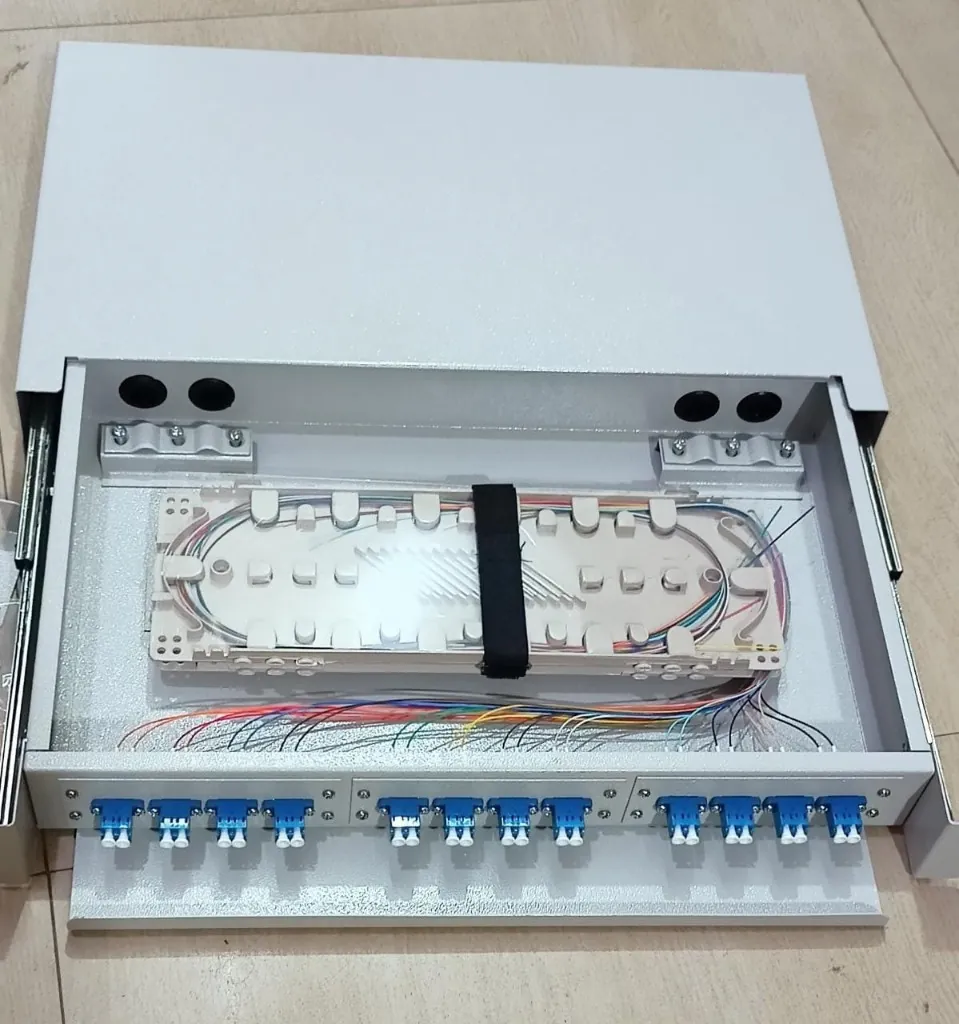
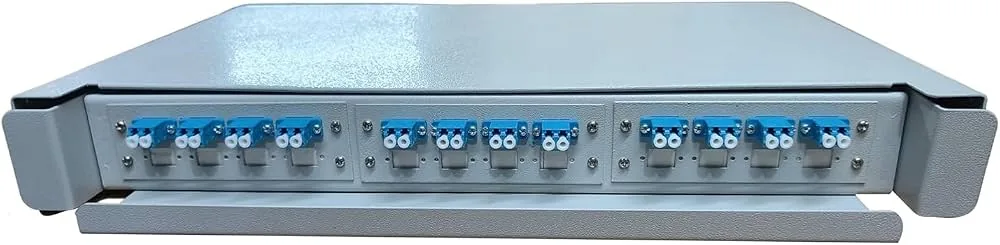
A rack-mount ODF holds adapters on the front panel and a splice tray inside, so the fibers are protected and each port is labelled. Need terminations or testing? See the fiber splicing service.
Connector choice follows the equipment and the system design. The notes below show what you are likely to meet, and the final selection always depends on your specific equipment and specification.
LC duplex is common for switch uplinks that use SFP/SFP+ modules. SC still appears on some panels and media converters.
LC duplex is the usual choice for high-density duplex links. Parallel-optic links use MPO/MTP connectors instead.
Most duplex SFP/SFP+/SFP28 modules use LC. Single-fiber (BiDi) and other module types differ, so read the module datasheet.
SC/APC is widely specified for PON and FTTH distribution. LC/APC and SC/UPC also appear, depending on the equipment.
A mix of SC and LC, UPC and APC. Access (PON) segments often call for APC, while Ethernet transport commonly uses UPC. Follow the network design.
Panels take LC or SC adapter plates. The adapter must match the connector family, the polish and the fiber type.
Usually an SFP port or a media converter at each end, often with LC. Some converters use SC, so check both devices.
LC and SC are both common between buildings and industrial switches. Older ST connectors still exist in some installations.
Single-mode (OS2) with LC or SC, UPC or APC as the equipment specifies. Link-loss budget and return loss matter more as distance grows.
Backbone fiber is terminated on patch panels (pigtails or pre-terminated cable), then patched with LC or SC cords. Test and document every link.
Work through these checks in order. Most wrong orders come from skipping step 1 or step 3.
Do not choose connectors by colour alone. Blue and green housings are common conventions, not guarantees. Read the printed marking and the datasheet.
These are general characteristics of fiber optic systems, not guaranteed benefits of any particular connector design.
The end-face geometries differ, which can add loss and reflections and may damage the end faces.
Do this instead: Match polish on every mated pair.
An LC cord will not plug into an SC port, and a wrong guess means a return or a hybrid cord.
Do this instead: Check the port or adapter first.
A mismatch can cause high loss or a link that does not come up, even when the connectors physically fit.
Do this instead: Keep fiber type consistent end to end.
The module decides the wavelength, fiber type, reach and often the connector.
Do this instead: Read the module datasheet before ordering cords.
Dust and oil on the end face are a leading cause of high loss and unstable links.
Do this instead: Inspect, clean and re-inspect before every mating.
Tight bends and crushed cable raise loss and can break the fiber.
Do this instead: Follow the cable maker's minimum bend radius.
A duplex link needs transmit to meet receive. A simplex cord or a wrongly keyed pair will not work.
Do this instead: Confirm simplex or duplex and the polarity method.
Colours are conventions and vary between makers, products and fiber types.
Do this instead: Read the printed connector and polish marking.
Missing specifications make compatibility impossible to confirm.
Do this instead: Ask for the datasheet and confirm every parameter.
Never look into an active fiber connector or port. The light is usually invisible and can harm your eyes. Do not inspect a live fiber with the naked eye, and follow the equipment manufacturer's safety procedures.
Need fiber termination or testing done on site? TRULINK offers a fiber splicing and testing service and network installation and cabling in Gurgaon and Delhi NCR.
Looking for fiber optic connectivity products for an office network, enterprise deployment, telecom installation or data center? TRULINK helps customers explore networking products and IT infrastructure solutions. Contact our team to discuss your fiber optic connectivity requirements, product compatibility and project needs.
Tell us the connector type, fiber type, polish, length and quantity you need, and the TRULINK team will confirm what is available and share a quote. Product availability and pricing are confirmed by the team.
A fiber optic connector terminates the end of an optical fiber and holds its core in precise alignment, so the fiber can be joined to another fiber, a patch panel or an optical port. Connectors are described by their family (LC, SC, ST, FC, MPO/MTP), their end-face polish (UPC or APC) and the fiber type they are built for.
LC is a small-form-factor connector with a 1.25 mm ferrule and a latch, so more ports fit in the same space. SC is larger, with a 2.5 mm ferrule, a square body and a push-pull coupling. Both come in single-mode and multimode versions and in UPC and APC polish. Choose the one your equipment, adapter or patch panel uses.
LC stands for Lucent Connector. It was developed by Lucent Technologies and is now a widely used small-form-factor connector.
SC stands for Subscriber Connector. It is also commonly called a Standard Connector, and some people call it a Square Connector because of its body shape.
Both are polish types for the ferrule end face. UPC (Ultra Physical Contact) has a curved polish that meets the mating fiber head-on. APC (Angled Physical Contact) has a curved polish at an angle of about 8 degrees, which sends reflected light away from the core and typically gives better return loss. Neither is "faster": they differ in reflection control and in where each is specified.
No. Do not mate an APC connector with a UPC connector or port, or the other way round. The end faces do not match, which can cause high loss and reflections and may damage the end faces. A patch cord can legitimately have APC on one end and UPC on the other, as long as each end mates only with its own polish type.
Neither is better in every case. LC suits high-density equipment and most duplex SFP-type modules. SC suits many telecom, FTTH and patch-panel applications. The right answer is the connector your equipment and the rest of the link are built for.
Neither is universally better. APC typically has better return loss and is specified in many PON, FTTH and CATV systems. UPC is common in general Ethernet and many other optical links. Follow the specification of your equipment and adapters.
Yes. LC connectors and patch cords are made for single-mode fiber (commonly OS2, 9/125 µm) in both UPC and APC versions. Make sure the whole assembly is specified for single-mode.
Yes. LC assemblies are made for multimode fiber as well, such as OM3 and OM4. Choose the multimode grade that matches your transceivers and link design.
Both use the same LC body and 1.25 mm ferrule. The difference is the polish: LC/UPC is polished flat to the fiber axis with a curve, and LC/APC is polished at about 8 degrees. They must be mated only with their own type. Many Ethernet modules specify LC/UPC, and LC/APC is used where the equipment datasheet calls for it.
Both use the same SC body and 2.5 mm ferrule. SC/UPC has the standard curved polish, and SC/APC has the angled polish. SC/APC is widely specified in FTTH and PON links, and SC/UPC is common on general single-mode links and patch panels. Never mate one with the other.
SC/APC is commonly used in FTTH and PON networks (distribution, splitters and customer-end equipment), in CATV and RF-over-fiber systems, and wherever the equipment specifies APC. Confirm against the device documentation, because some equipment uses LC/APC or SC/UPC instead.
A simplex cord has one fiber and one connector at each end. A duplex cord has two fibers and two connectors at each end, held together by a clip, with one fiber for transmit and one for receive. Duplex is the normal choice for standard SFP, SFP+ and SFP28 modules. Simplex is used for BiDi (single-fiber) modules, many PON and FTTH links and pigtails. Neither is faster; they only describe how the fibers are arranged.
Duplex LC is a pair of LC connectors joined side by side by a clip, so both fibers of a two-way link plug in together. It fits the two LC ports on a typical optical transceiver, one for transmit and one for receive.
Single-mode fiber has a very small core (about 9 µm), uses laser light at 1310 nm or 1550 nm and carries signals over long distances, from hundreds of metres to many kilometres. Multimode fiber has a larger core (50 or 62.5 µm), usually runs at 850 nm and suits shorter links inside buildings and data centers, for example up to 300 m on OM3 and 400 m on OM4 at 10 Gbps. They need matching transceivers and should not be mixed in one link.
You should not. The fiber type must match the transceiver. Sending multimode light into a single-mode fiber loses most of the light because the core is so much smaller, and a single-mode module on multimode fiber is only acceptable in special legacy cases with mode-conditioning cords. Read the module datasheet and use the matching fiber type and grade.
Read the print on the jacket (for example 9/125 OS2 for single-mode or 50/125 OM3 for multimode) and check the colour: yellow is usually single-mode, orange or aqua is usually multimode. Colours are a convention, so confirm with the printed marking and the product datasheet.
A patch cord has a connector on both ends and plugs straight into equipment or a panel. A pigtail has a connector on one end and bare fiber on the other; the bare end is fusion-spliced to an installed cable inside an ODF or splice tray. Both are available in LC and SC, UPC and APC, single-mode and multimode.
Confirm the connector family at each end (LC, SC or other), the fiber type (single-mode or multimode, with the grade), the polish (UPC or APC), simplex or duplex, the length and the cable jacket. Then check the transceiver specification and the adapters or panels in the path. If any detail is unknown, read the equipment documentation or ask a qualified technician before ordering.
You can browse the fiber category at TRULINK or contact the team with your requirement. Share the device models, connector types, fiber type, polish and quantity so the team can help confirm compatibility. Whichever supplier you use, check the product datasheet before you order.
This guide is general information. Always follow the specifications and safety instructions of your equipment and cable manufacturers. Colour conventions, loss figures and reach figures vary by product and standard.